March 24, 2010
December 8, 2009
October 28, 2009
September 4, 2009
September 4, 2009


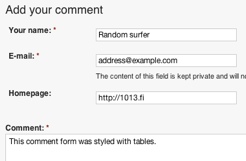
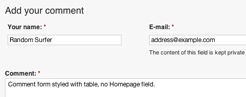
Theming Drupal comment forms is like theming web forms, except for one trick: it requires you to add your template to Drupal theme registry. I'll explain in this tutorial how to do that and how to change the form layout using tables, so that the labels are on the left side of the form elements. This article builds on the most popular tutorial on my site: Drupal web form theming tutorial, so be sure to check that one first.
Firstly, you can change comment form layout in Drupal without any modules: you can enable subject and contact information fields (Your name, E-mail and Homepage) using: Administer › Content management › Page (or some other content type) › Comment settings. Then toggle Comment subject field or in Anonymous commenting select "Anonymous posters must leave their contact information".
Then there are several free modules to customize the form as you wish, for example:
If ready modules aren't enough for you, I recommend that you use this tutorial as a staring point. Once you get it working it's easy to alter the form freely: change/translate texts, set some default values or add some JavaScript to do a client-side validation, for example.
Versions
Article was written for Drupal 6.
Let's start with that one trick I mentioned... With many Drupal components, like forms, it's enough that you drop a template file into your theme folder. However some of them need to be registered manually to the theme registry. Comment form is one of those. Typically to Drupal, configuration is made easy: there's no need to alter any core files, you just need to add few lines to hook_theme in template.php. The actual name of this function depends on you theme - if you're using the default Garland theme it would be garland_theme. Add the following into your template's template.php, e.g. sites/all/themes/garland/template.php
function garland_theme(){
  return array(
    'comment_form' => array(
      'arguments' => array('form' => NULL),
      'template' => 'comment-form',
    ),
  );
}
Next you need to provide a template... Here I'm styling the form with a helper for forms table layout. Copy the helper and create the following kind of file for the template at sites/all/themes/garland/comment-form.tpl.php
<?php
// file defined in http://1013.fi/cms/theming-drupal-web-forms
include_once( 'form-formatting-helpers.php' );
// dpm( $form ); // debugging using developer module

// create table only when we're asking for a name - i.e. user is anonymous
// (logged in users automatically see username taken from their profile)
if( $form['name'] ) {
	// steal (reference) the interesting parts of the comment form into a new
	// array that looks like a fieldset
	$personal_info_fieldset = array(
		'#type' => "fieldset",
		'name' => &$form['name'],
		'mail' => &$form['mail'],
		'homepage'=> &$form['homepage']
	);

	// render the newly created fieldset into a table
	// notice that the function works by reference, so there's no return value
	fielset_labels_on_left_array( $personal_info_fieldset, false, 30 );

	// print the table
	// rendering them marks them done, meaning that they won't get rendered anymore
	// when we render the rest of the form
	print drupal_render( $personal_info_fieldset );
}

// Always print out the entire $form. This renders the remaining pieces of the
// form that haven't yet been rendered above.
print drupal_render( $form );
After this you're ready to flush the theme registry cache and try it out.
Finally, you can make a simple change to your stylesheets to get rid off the zebra table effect where odd and even rows have different background colors:
#comment-form tr.odd,
#comment-form tr.even,
#comment-form tr.odd td,
#comment-form tr.even td {
    background-color: inherit;
}
Here's an alternative template without Homepage field and without any dependencies to other files:
<?php
// create a table with one row and two cells containing form fields
$rows = array();
$rows[] = array(
	0 => drupal_render( $form['name'] ),
	1 => drupal_render( $form['mail'] )
);

unset( $form['homepage'] );

print theme('table', array(), $rows);

// Always print out the entire $form. This renders the remaining pieces of the
// form that haven't yet been rendered above.
print drupal_render( $form );
Finalize the design by aligning cell contents to top instead of default center.
#comment-form td {
    vertical-align: top;
}
Customizing Drupal comments has been discussed in several articles and comments on the Drupal website, including:


Hi,
I've seen some drupal websites inserting user avatars into the comment form (like facebook's comment system). But no matter how much I've searched, I can't find a solution for this.
Expected behaviour: display the user picture of the currently logged in user to the left of "Your name" field. If the user is anonymous or does not have a picture, print default avatar.
Do you know how to do this? This would be a great help - I just can't figure out the right code.
There are some ready Drupal modules that enable users to set their own avatars for comments - see Drupal and Drupal Modules websites. One popular solution is Gravatar Drupal module that integrates to Gravatar web service. This web service makes it easy to use avatars, because users don't need to upload them separately to each website - instead they are uploaded once to the Gravatar website and then fetched from there when user writes comments on different web pages.
If the user is anonymous or does not have a picture, print default avatar.
I like how your comments show under the original post and the simple styling. I am not getting anything like that so I am obviously not following this sufficiently. Can you dumb it down a little for me?
First, it's easy to configure comment form location in Drupal once you know where to look - using admin menu, you'll find it at: Content Management > Content Types > Edit page > Comment Settings > Location of comment submission form. Second, many starter themes (see also: starter theme comparison) provide simple styling for the comments, on top of which you can easily build your own custom styles.
Thanks, when I get the site online I was thinking of using Disqus and facebook because these days, unless you are doing a major community site nobody will join up or at least not for a long time.
The next project I have will be a community site and I'll focus more on the comments section then.
Joe
Yeah, Disqus seems like an interesting alternative to Drupal's built-in commenting system - helps to fight spam and to share the comments in Facebook. Good luck with your project!
Thanks, when I get one of them going I'll post a link here.
Take care
Joe